
 Kia Rio: Rear Torsion Beam Axle Replacement
[Disc Type]
| 1. |
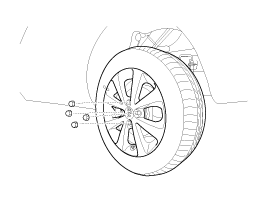
Remove the rear wheel & tire.
|
| 2. |
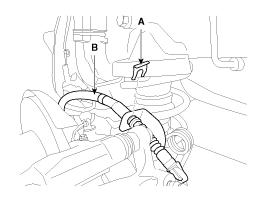
Remove the clip (A) and then remove the parking brake cable (B).
|
| 3. |
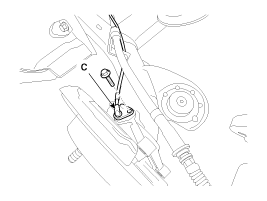
Remove the wheel speed sensor (A).
|
| 4. |
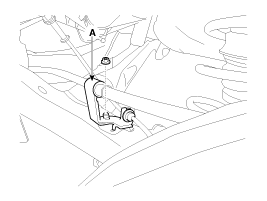
Remove the parking brake cable & wheel speed sensor cable bracket
(A).
|
| 5. |
Remove the brake caliper assembly (B) from the torsion beam axle
by loosening the bolts (A).
|
| 6. |
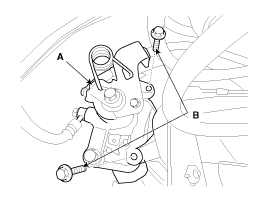
Loosen the bolt & nut and then remove the rear shock absorber
(A) from the torsion beam axle (B).
|

| 7. |
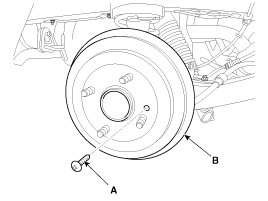
Loosen the screw (A) and then remove the disc (B).
|
| 8. |
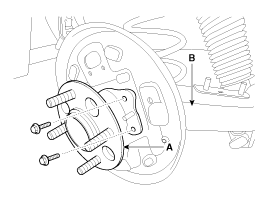
Loosen the hub mounting bolt and then remove the hub (A) from
the torsion beam (B).
|
| 9. |
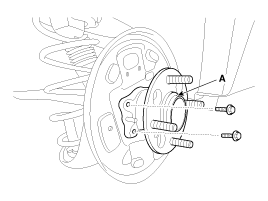
Loosen the bolt and then remove the torsion beam axle (A) from
the body.
|
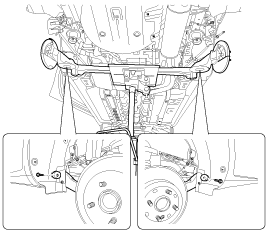
| 10. |
Installation is the reverse of removal.
|
[Drum Type]
| 1. |
Remove the rear wheel & tire.
|
| 2. |
Loosen the screw (A) and then remove the disc (B).
|
| 3. |
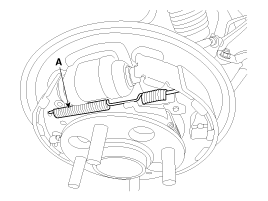
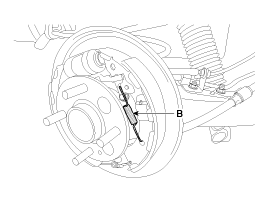
Remove the spring(A, B, C).
|

| 4. |
Remove the shoe (A).
|

| 5. |
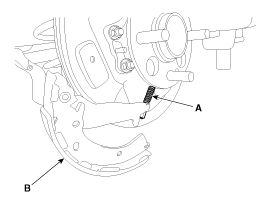
Disconnect the parking brake cable (A) from lining (B).
|
| 6. |
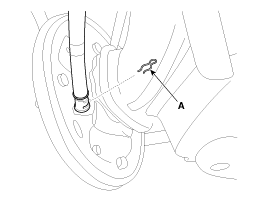
Remove the clip (A).
|
| 7. |
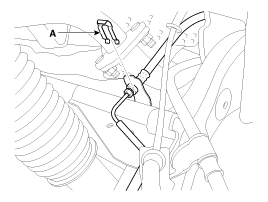
Remove the parking brake cable clip (A).
|
| 8. |
Remove the clip (A) and then remove the parking brake cable (B).
|
| 9. |
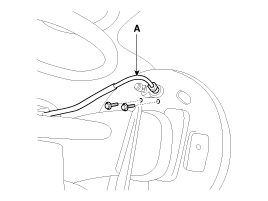
Remove the brake hose (A) and then loosen the cylinder bolt.
|
| 10. |
Loosen the hub mounting bolt and then remove the hub (A) from
the torsion beam (B).
|
| 11. |
Loosen the bolt & nut and then remove the rear shock absorber
(A) from the torsion beam axle (B).
|
| 12. |
Loosen the bolt and then remove the torsion beam axle (A) from
the body.
|
| 13. |
Install in the reverse order of removal.
|
 Rear Coil Spring Inspection
1.
Check the coil spring for crack and deformation.
2.
Check the coil spring pad for damage and deformation.
...
 Tires/Wheels
...
See also:
In car sensor (FATC only) Description
The In-car air temperature sensor is built in the heater & A/C control
unit.
The sensor contains a thermistor which measures the temperature of the
inside. The signal decided by the r ...
Specification
HO2S [Bank 1/Sensor 1]
Item
Specification
Heater Resistance (Ω)
2.4 ~ 4.0 [20°C(68°F)]
HO2S [Bank 1/Sensor 2]
A/F Ratio (λ)
...
Removal
1.
Turn ignition switch OFF, and disconnect the negative (-) battery
cable.
2.
Remove the battery and ECM.
(Refer to the Engine Ele ...
Categories
- Kia Rio Manuals Home
- Kia Rio YB 2017-2026 Owners Manual
- Kia Rio YB 2017-2026 Service Manual
- Kia Rio UB 2012-2017 Owners Manual
- Kia Rio UB 2012-2017 Service Manual
- Downloads

Copyright © www.kirmanual.com 2014-2026