
 Kia Rio: Antenna Inspection
Antenna Cable
| 1. |
Remove the antenna jack from the audio unit and antenna.
|
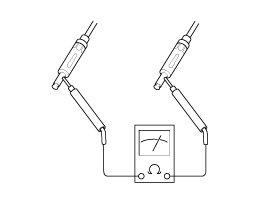
| 2. |
Check for continuity between the center poles of antenna cable.
|
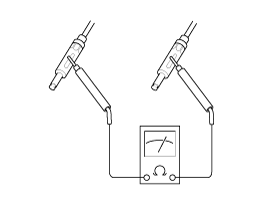
| 3. |
Check for continuity between the outer poles of antenna cable.
There should be continuity.
|
| 4. |
If there is no continuity, replace the antenna cable.
|
| 5. |
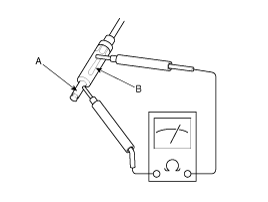
Check for continuity between the center pole (A) and outer pole
(B) of antenna cable. There should be no continuity.
|
| 6. |
If there is continuity, replace the antenna cable.
|
 Speakers Installation
Front Speaker
1.
Install the front speaker.
2.
Install the front door trim.
Rear Speaker
1.
Install the ...
 Antenna Removal
1.
Remove the rear roof trim.
(Refer to the Body group - Roof trim).
2.
Disconnect the antenna cable and the connector (A).
...
See also:
Ignition Coil: Removal
1.
Disconnect the battery nagative terminal.
2.
Remove the engine cover.
3.
Disconnect the ignition coil connec ...
Replacement
Rear Brake Pads
1.
Loosen the guide rod bolt (B) and then remove the rear caliper
body (A).
Tightening torque:
21.6 ~ 31 ...
Front Washer Motor Installation
1.
Install the washer reservoir.
Before installing the pump motor, check ...
Categories
- Kia Rio Manuals Home
- Kia Rio YB 2017-2026 Owners Manual
- Kia Rio YB 2017-2026 Service Manual
- Kia Rio UB 2012-2017 Owners Manual
- Kia Rio UB 2012-2017 Service Manual
- Downloads

Copyright © www.kirmanual.com 2014-2026