
 Kia Rio: Power Window Switch Inspection
Power Window Main Switch Inspection
| 1. |
Disconnect the negative (-) battery terminal.
|
| 2. |
Remove the front door trim panel.
(Refer to the BD group - "Front door")
|
| 3. |
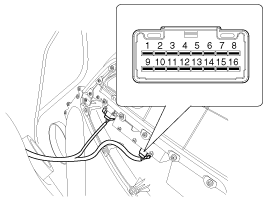
Disconnect the connector from the switch.
|
| 4. |
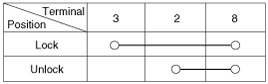
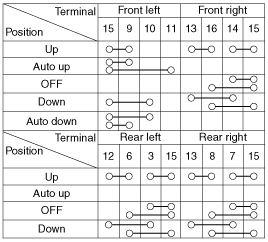
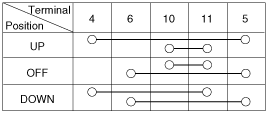
Check for continuity between the terminals in each switch position
according to the table. If the continuity condition is not normal, replace
the switch.
|
Passenger Power Window Switch Inspection
| 1. |
Disconnect the negative (-) battery terminal.
|
| 2. |
Remove the front door trim panel.
(Refer to the BD group - "Front door")
|
| 3. |
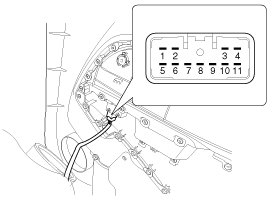
Disconnect the connector from the switch.
|
| 4. |
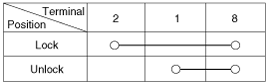
Check for continuity between the terminals in each switch position
according to the table. If the continuity condition is not normal, replace
the switch.
|
Rear Power Window Switch Inspection
| 1. |
Disconnect the negative (-) battery terminal.
|
| 2. |
Remove the rear door trim panel.
(Refer to the BD group - "Rear door")
|
| 3. |
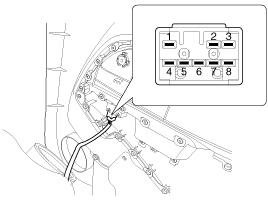
Disconnect the 8P connector from the switch.
|
| 4. |
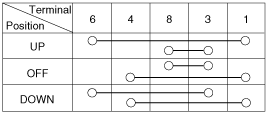
Check for continuity between the terminals in each switch position
according to the table. If the continuity condition is not normal, replace
the switch.
|
Rear Glass Defogger
 Power Window Switch Circuit Diagram
Driver Power Window Switch
Passenger Power Window Switch
Rear Power Window Switch
...
See also:
Spark Plug: Inspection
[On vehicle inspection]
1.
Accelerate the engine to about 3,000 rpm 3 times or more.
2.
Remove the spark plug.
...
Compressor Oil Specification
1.
The HFC-134a system requires synthetic compressor oil (PAG) whereas
the R-12 system requires mineral compressor oil. The two oils must never
be mixed.
...
Description
The Alternator has eight built-in diodes, each rectifying AC current to
DC current.
Therefore, DC current appears at alternator "B" terminal.
In addition, the charging voltage ...
Power Window Switch Circuit Diagram
Driver Power Window Switch
Passenger Power Window Switch
Rear Power Window Switch
...

See also:
Spark Plug: Inspection
[On vehicle inspection]
1.
Accelerate the engine to about 3,000 rpm 3 times or more.
2.
Remove the spark plug.
...
Compressor Oil Specification
1.
The HFC-134a system requires synthetic compressor oil (PAG) whereas
the R-12 system requires mineral compressor oil. The two oils must never
be mixed.
...
Description
The Alternator has eight built-in diodes, each rectifying AC current to
DC current.
Therefore, DC current appears at alternator "B" terminal.
In addition, the charging voltage ...
Categories
- Kia Rio Manuals Home
- Kia Rio YB 2017-2026 Owners Manual
- Kia Rio YB 2017-2026 Service Manual
- Kia Rio UB 2012-2017 Owners Manual
- Kia Rio UB 2012-2017 Service Manual
- Downloads

Copyright © www.kirmanual.com 2014-2026