
 Kia Rio: Smart key unit Removal
Smart key unit
| [USA] |
| 1. |
Disconnect the negative(-) battery terminal.
|
| 2. |
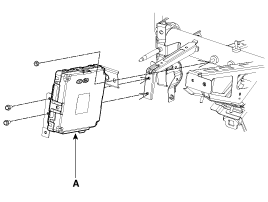
Remove the smart key unit (A) after disconnecting the connector
and loosening the mounting nut (1EA) and bolts (2EA).
|
| [CANADA] |
| 1. |
Disconnect the negative(-) battery terminal.
|
| 2. |
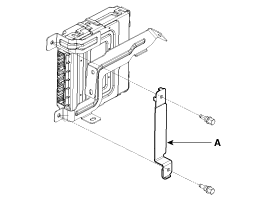
Remove the bracket (A) after loosening the bolts (2EA).
|
| 3. |
Remove the smart key unit (A) after disconnecting the connector
and loosening the mounting nut (1EA) and bolts (2EA).
|
Interior 1 Antenna
|

| 1. |
Disconnect the negative(-) battery terminal.
|
| 2. |
Remove the heater & A/C controller..
(Refer to the HA group - "Controller")
|
| 3. |
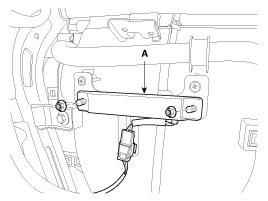
Remove the interior 1 antenna (A) after disconnecting the connector
and loosening the nuts (2EA).
|
Interior 2 Antenna
| 1. |
Disconnect the negative(-) battery terminal.
|
| 2. |
Remove the console.
(Refer to the BD group - "Console")
|
| 3. |
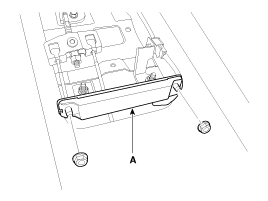
Disconnect the interior 2 antenna connector, then remove the interior
2 antenna (A) after loosening nuts (2EA).
|
Trunk Antenna
| 1. |
Disconnect the negative(-) battery terminal.
|
| 2. |
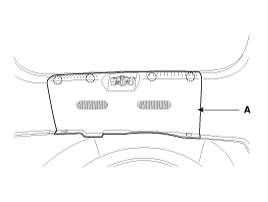
Remove the trunk transverse trim (A).
|
| 3. |
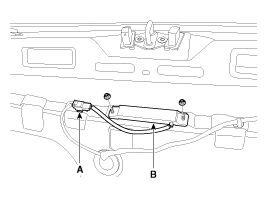
Disconnect the trunk antenna connector (A) and remove the trunk
antenna (B) after loosening nuts (2EA).
|
Exterior Bumper Antenna
| 1. |
Disconnect the negative(-) battery terminal.
|
| 2. |
Remove the rear bumper.
(Refer to the BD group - "Rear bumper")
|
| 3. |
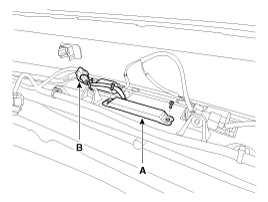
Disconnect the antenna connector (B) and remove the exterior bumper
antenna (A) after loosening the screws (2EA).
|
Buzzer
| 1. |
Disconnect the negative(-) battery terminal.
|
| 2. |
Remove the left side wheel guard.
|
| 3. |
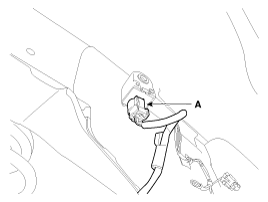
Remove the external buzzer (A) after disconnecting the connector.
|
Door Outside Handle
| 1. |
Disconnect the negative (-) battery terminal.
|
| 2. |
Remove the front door module.
(Refer to the BD group - "Front door")
|
| 3. |
After loosening the mounting bolt, then remove the outside handle
cover (A).
|
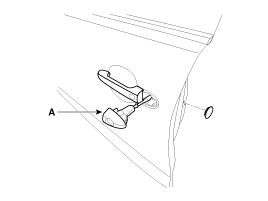
| 4. |
Remove the outside handle (A) by sliding it rearward.
|
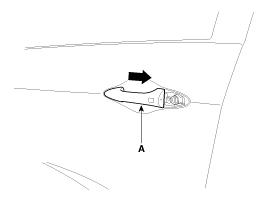
| 5. |
Disconnect the outside handle connector.
|
Trunk lid open switch
| 1. |
Disconnect the negative(-) battery terminal.
|
| 2. |
Remove the trunk door trim.
(Refer to the BD group - "Trunk")
|
| 3. |
Disconnect the trunk lid open switch connector (A).
|
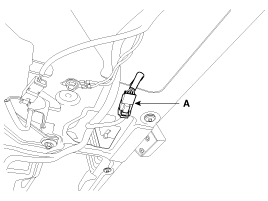
| 4. |
Remove the trunk open switch (A) from the trunk garnish.
|
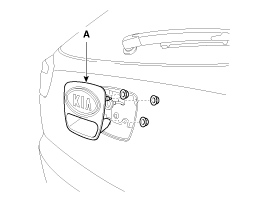
 Smart key unit Inspection
Smart Key Unit
-
Refer to the BE group - inspection / self diagnosis with GDS.
Smart Key Switch
-
Refer to the BE group - inspection / self di ...
 Smart key unit Installation
Smart Key Unit
1.
Install the smart key unit.
2.
Install the smart key unit mounting nuts and connector.
3.
...
See also:
Description
Fuel Tank Pressure Sensor (FTPS) is a component of the evaporative emission
control system and is installed on the fuel tank, the fuel pump, or the canister.
It checks the purge control solen ...
Circuit Diagram
(M/T)
(A/T)
...
Description
-
EPS (Electronic Power Steering, Column assist type) system uses
an electric motor to assist the steering force and it is an engine operation
independent steering system ...
Categories
- Kia Rio Manuals Home
- Kia Rio YB 2017-2026 Owners Manual
- Kia Rio YB 2017-2026 Service Manual
- Kia Rio UB 2012-2017 Owners Manual
- Kia Rio UB 2012-2017 Service Manual
- Downloads

Copyright © www.kirmanual.com 2014-2026