
 Kia Rio: Display settings
Press the ![Select [Display] through](images/books/4/1/page.h157.gif) key
key
 Select [Display] through
 TUNE knob or
 key
key
 Select menu through
 TUNE knob
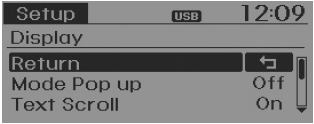
Mode Pop up
[Mode Pop up]  Changes
 /
/
 selection mode
During On state, press the  or
or
 key to display the mode change pop
up screen.
Text Scroll
[Text Scroll]  Set
Set
 /
/
 : Maintains scroll
 : Scrolls only one (1) time.
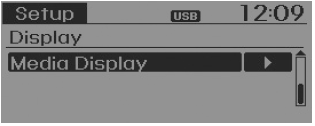
Media Display
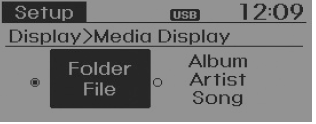
When playing an MP3 file, select the desired display info from ‘Folder/File’ or ‘Album/Artist/Song’.
Sound settings
Press the ![Select [Sound] through](images/books/4/1/page.h176.gif) key
key
 Select [Sound] through
 TUNE knob or
 key
key
 Select menu through
 TUNE knob
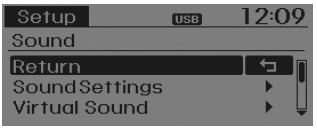
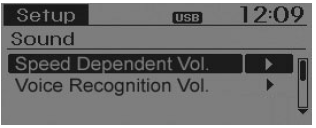
Sound Settings
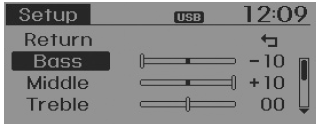
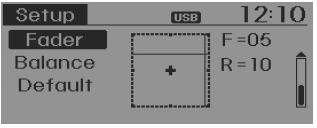
This menu allows you to set the ‘Bass, Middle, Treble’ and the Sound Fader and Balance.
Select [Sound Settings]  Select
menu through  TUNE knob
 Turn
Turn
 TUNE knob left/right to set
- Bass, Middle, Treble : Selects the sound tone.
- Fader, Balance : Moves the sound fader and balance.
- Default : Restores default settings.
❈ Back : While adjusting values, repressing the
 TUNE knob will restore the parent
menu.
Virtual Sound
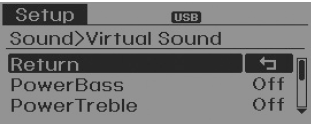
The Poewr Bass, Power Treble, and Surround can be set.
Select [Virtual Sound]  Set menu
through  TUNE knob
 Set
Set
 /
/
 through
 TUNE knob
- PowerBass : This is a sound system feature that provides live bass.
- PowerTreble : This is a sound system feature that provides live treble.
- Surround : This is a sound system feature that provides surround sound.
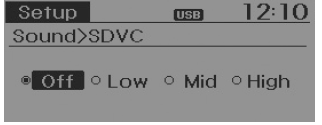
Speed Dependent Volume Control
This feature is used to automatically control the volume level according to the speed of the vehicle.
Select [SDVC] ![Low/Mid/High] of TUNE knob](images/books/4/1/page.h198.gif) Set in 4 levels [Off/
Set in 4 levels [Off/
Low/Mid/High] of  TUNE knob
Voice Recognition Volume
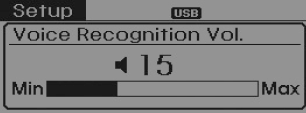
Adjusts voice recognition volume. Select [Voice Recognition Vol.]
 Set volume of
 TUNE knob
Clock settings
Press the ![Select [Clock] through](images/books/4/1/page.h204.gif) key
key
 Select [Clock] through
 TUNE knob or
 key
key
 Select menu through
 TUNE knob
Clock Settings
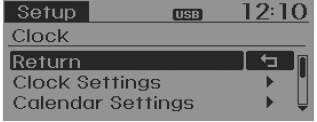
This menu is used to set the time. Select [Clock Settings]
 Set through
 TUNE knob
 Press
Press
 TUNE knob
![❈ Adjust the number currently in focus to set the [hour] and press the TUNE knob](images/books/4/1/page.h216.gif)
❈ Adjust the number currently in focus to set the [hour] and press the TUNE knob to set the [minute].
Calendar Settings
This menu is used to set the date (MM/DD/YYYY).
Select [Calendar Settings]
Set through  TUNE knob
 Press
Press
 TUNE knob
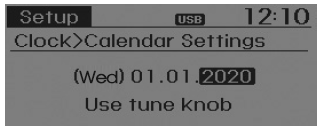
❈ Adjust the number currently in focus to make the settings and press the TUNE knob to move to the next setting. (Set in order of Month/Day/Year)
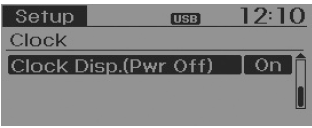
Clock Display when Power is OFF
Select [Clock Disp.(Pwr Off)  Set
Set
 /
/
 through
 TUNE knob
 : Displays time/date on screen
 : Turn off.
 Audio Head Unit
1. (EJECT)
Ejects the disc.
2.
Changes to FM/AM/SIRIUS mode.
Each time the key is pressed, the mode is changed in order of FM1 ➟ FM2
➟ AM ➟ SAT1 ➟ SAT2 ...
 System settings
Press the key
Select [System]
Select menu through
TUNE knob
Memory Information
Displays currently used memory and total system memory.
Select [Memory Information]
OK
The ...
See also:
Tail Gate Replacement
Tail Gate Assembly Replacement
•
When removing and installing the tail gate, an assistan ...
Inspection
1.
Connect the GDS on the Data Link Connector (DLC).
2.
Measure the output voltage of the MAPS at idle and IG ON.
Spe ...
Transmitter Code Registration (Using GDS)
1.
Connect the DLC cable of GDS to the data link connector (16 pins)
in driver side crash pad lower panel, turn the power on GDS.
2.
...
Categories
- Kia Rio Manuals Home
- Kia Rio YB 2017-2025 Owners Manual
- Kia Rio YB 2017-2025 Service Manual
- Kia Rio UB 2012-2017 Owners Manual
- Kia Rio UB 2012-2017 Service Manual
- Downloads
