
 Kia Rio: Display settings
Press the ![Select [Display] through](images/books/4/1/page.h157.gif) key
key
 Select [Display] through
 TUNE knob or
 key
key
 Select menu through
 TUNE knob
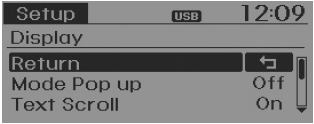
Mode Pop up
[Mode Pop up]  Changes
 /
/
 selection mode
During On state, press the  or
or
 key to display the mode change pop
up screen.
Text Scroll
[Text Scroll]  Set
Set
 /
/
 : Maintains scroll
 : Scrolls only one (1) time.
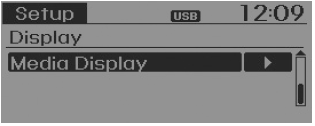
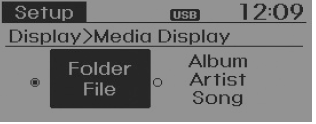
Media Display
When playing an MP3 file, select the desired display info from ‘Folder/File’ or ‘Album/Artist/Song’.
Sound settings
Press the ![Select [Sound] through](images/books/4/1/page.h176.gif) key
key
 Select [Sound] through
 TUNE knob or
 key
key
 Select menu through
 TUNE knob
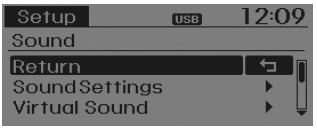
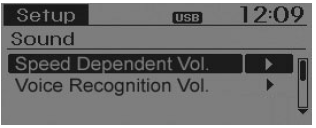
Sound Settings
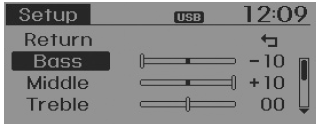
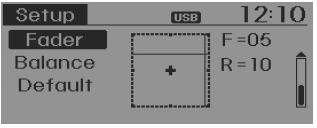
This menu allows you to set the ‘Bass, Middle, Treble’ and the Sound Fader and Balance.
Select [Sound Settings]  Select
menu through  TUNE knob
 Turn
Turn
 TUNE knob left/right to set
- Bass, Middle, Treble : Selects the sound tone.
- Fader, Balance : Moves the sound fader and balance.
- Default : Restores default settings.
❈ Back : While adjusting values, repressing the
 TUNE knob will restore the parent
menu.
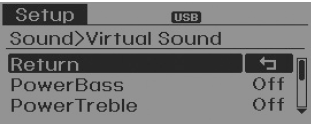
Virtual Sound
The Poewr Bass, Power Treble, and Surround can be set.
Select [Virtual Sound]  Set menu
through  TUNE knob
 Set
Set
 /
/
 through
 TUNE knob
- PowerBass : This is a sound system feature that provides live bass.
- PowerTreble : This is a sound system feature that provides live treble.
- Surround : This is a sound system feature that provides surround sound.
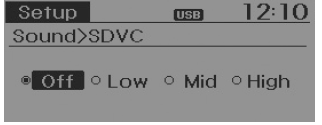
Speed Dependent Volume Control
This feature is used to automatically control the volume level according to the speed of the vehicle.
Select [SDVC] ![Low/Mid/High] of TUNE knob](images/books/4/1/page.h198.gif) Set in 4 levels [Off/
Set in 4 levels [Off/
Low/Mid/High] of  TUNE knob
Voice Recognition Volume
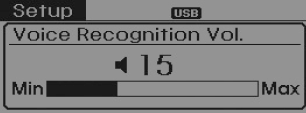
Adjusts voice recognition volume. Select [Voice Recognition Vol.]
 Set volume of
 TUNE knob
Clock settings
Press the ![Select [Clock] through](images/books/4/1/page.h204.gif) key
key
 Select [Clock] through
 TUNE knob or
 key
key
 Select menu through
 TUNE knob
Clock Settings
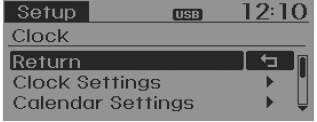
This menu is used to set the time. Select [Clock Settings]
 Set through
 TUNE knob
 Press
Press
 TUNE knob
![❈ Adjust the number currently in focus to set the [hour] and press the TUNE knob](images/books/4/1/page.h216.gif)
❈ Adjust the number currently in focus to set the [hour] and press the TUNE knob to set the [minute].
Calendar Settings
This menu is used to set the date (MM/DD/YYYY).
Select [Calendar Settings]
Set through  TUNE knob
 Press
Press
 TUNE knob
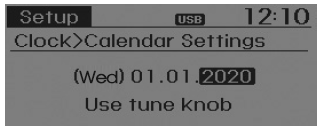
❈ Adjust the number currently in focus to make the settings and press the TUNE knob to move to the next setting. (Set in order of Month/Day/Year)
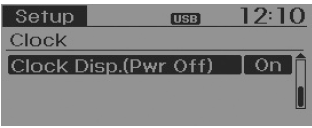
Clock Display when Power is OFF
Select [Clock Disp.(Pwr Off)  Set
Set
 /
/
 through
 TUNE knob
 : Displays time/date on screen
 : Turn off.
 Audio Head Unit
1. (EJECT)
Ejects the disc.
2.
Changes to FM/AM/SIRIUS mode.
Each time the key is pressed, the mode is changed in order of FM1 ➟ FM2
➟ AM ➟ SAT1 ➟ SAT2 ...
 System settings
Press the key
Select [System]
Select menu through
TUNE knob
Memory Information
Displays currently used memory and total system memory.
Select [Memory Information]
OK
The ...
See also:
Installation
•
Install the component with the specified torques.
•
...
Overhead Console Lamp Installation
1.
Install the overhead console lamp after connecting the sunroof
switch connector and lamp connector.
2.
Install the lens after tightening ...
AGM Battery: Description
AGM battery is used for especially heavy load on the vehicle network depending
on equipment and requirements. AGM stands for Absorbent Glass Material Battery;
that is absorbent glass fibre fl ...
Categories
- Kia Rio Manuals Home
- Kia Rio YB 2017-2026 Owners Manual
- Kia Rio YB 2017-2026 Service Manual
- Kia Rio UB 2012-2017 Owners Manual
- Kia Rio UB 2012-2017 Service Manual
- Downloads
