
 Kia Rio: Rear-camera display
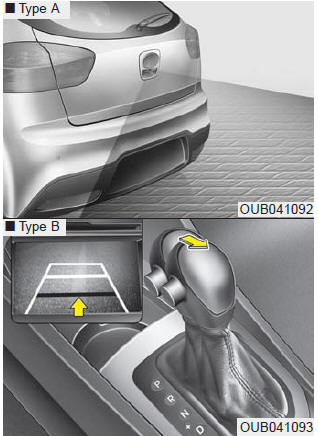
The Rear-Camera Display will activate when the back-up light is ON with the ignition switch ON and the shift lever in the R (Reverse) position.
This system is a supplemental system that displays a veiw form behind the vehicle through the UVO audio or navigation display while backing-up
Always keep the camera lens clean. If lens is covered with foreign matter, the camera may not operate normally.
WARNING - Rearview camera
The rear view camera is not a safety device. It only serves to assist the driver in identifying objects directly behind the middle of the vehicle. The camera does NOT cover the complete area behind the vehicle. While the camera's display is generally accurate, objects can be much closer than they appear in the display screen and can be distorted in both size and proportion.
WARNING - Backing & using camera
Never rely solely on the rear view camera when backing.You must always use methods of viewing the area behind you including looking over both shoulders as well as continuously checking all three rear view mirrors. Due to the difficulty of ensuring that the area behind you remains clear, always back slowly and stop immediately if you even suspect that a person, and especially a child, might be behind you.
 LCD display warning (if equipped)
For vehicle’s equipped with smart key system
Key is not in vehicle
If the smart key is not in the vehicle and if any door is opened or closed with
the engine start/stop button in the ACC, ON, ...
 Hazard warning flasher lighting
The hazard warning flasher should be used whenever you find it necessary to stop
the car in a hazardous location. When you must make such an emergency stop, always
pull off the road as far as po ...
See also:
Components
[AMS type (OAD)]
1. OAD (Overrunning Alternator Decoupler)
2. Front Bracket
3. Front Bearing
4. Stator
5. Rotor
6. Rear Bearing
7. Rear Bracket
8. ...
Instrument panel overview
1. Instrument cluster
2. Horn
3. Driver’s front air bag
4. Light control/Turn signals
5. Wiper/Washer
6. Ignition switch or ENGINE START/ STOP button
7. Hazard warning flasher switch
8. Aud ...
Starting the engine
WARNING - Proper footwear
Always wear appropriate shoes when operating your vehicle. Unsuitable shoes
(high heels, ski boots, sandals, etc.) may interfere with your ability to use the
brake and a ...
Categories
- Kia Rio Manuals Home
- Kia Rio YB 2017-2026 Owners Manual
- Kia Rio YB 2017-2026 Service Manual
- Kia Rio UB 2012-2017 Owners Manual
- Kia Rio UB 2012-2017 Service Manual
- Downloads
